Products
Knowledge & Support
Explore our Knowledge Hub:
Tips & Advice Education Area Case Studies The Grant House Virtual House FAQs Glossary Visit the Knowledge HubProducts
Knowledge & Support
Explore our Knowledge Hub:
Tips & Advice Education Area Case Studies The Grant House Virtual House FAQs Glossary Visit the Knowledge HubHow to read your heat pump’s performance data
Grant Aerona air source heat pumps provide detailed performance data via their controls to help homeowners and installers optimise system efficiency. Homeowners who understand basic heat pump data and optimised operating schedules can achieve improved performance with their heat pump heating system. This guide shares support for understanding the data presented by Grant heat pump controls for their Aerona³ and Aerona 290 heat pump models.
Quick links for this article…
In this guide, we will explain:
Where to see your heat pump’s performance data
Grant UK supply two heat pump controllers which manage the operation of their air-to-water heat pumps. The Aerona Smart Controller is compatible with both the Aerona³ and Aerona 290 heat pumps and the Aerona Remote Controller is suitable for use with the Aerona³ heat pumps only. Each of these controller options display data relating to the performance of a heat pump.
Aerona Smart Controller
The Aerona Smart Controller is an intuitive weather compensated heat pump controller for all Grant air source heat pumps. This smart controller has a sleek touchscreen display where homeowners can view and access with ease the operating information for their heat pump and wider heating system. The Grant Aerona Smart Controller display presents heat pump data including:
- room and circuit temperatures
- time schedules for the heating and domestic hot water (DHW)
- heating curve configuration (for optimal heat pump operation responding to the outdoor conditions)
- advanced monitoring to support efficient operation and diagnostics.
Installed alongside its own WiFi Hub, the Aerona Smart Controller can be remotely accessed using the ecoNET app which allows homeowners to monitor and adjust their controller when away from home.
Aerona Remote Controller
The Aerona Remote Controller is a simpler controller for use with the Aerona³ R32 air source heat pump range only. This controller is a white-cased wall-mounted unit featuring a simple interface where the heat pump’s core parameters can be viewed by homeowners. The Grant Aerona Remote Controller interface allows for the following functionality:
- view core heat pump and system parameters
- view heat pump data such as power consumption and flow / return temperatures
- view the heat pump’s operation, such as when a defrost cycle is happening or when heating or DHW demand is being called for
- switch the Aerona³ heat pump on and off, if required.
It is important to note that the Aerona Remote Controller is not compatible with apps.
Key performance data points and what they mean
There are a lot of terms to understand when it comes to performance data of air source heat pumps. To help you understand what different terms mean and whether their data represents good or poor heat pump performance, we have shared explanations for the most common phrases you will hear when describing your heat pump’s operation and where to find this data using the Aerona Smart Controller.
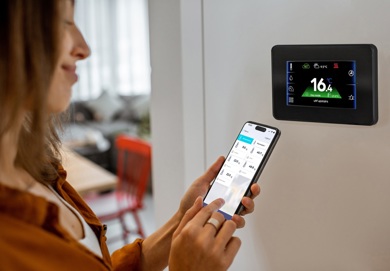
Flow and return temperatures
The flow temperature is the temperature of the system water leaving your heat pump and flowing into the wider heating system. The return temperature is the temperature of the system water coming back from the radiators or underfloor heating system to your heat pump. The flow temperature will be higher than the return temperature because as the water flows through your wider heating system, it will be transferring heat into your radiators or underfloor heating which in turn warms up your rooms.
When your installer designed your heat pump system, the flow temperature would have been a key part of the system design. Typically, the lower the flow temperature the more efficient your heat pump will be because air source heat pumps operate better when producing lower flow temperatures at between 35ºC-45ºC depending on the emitter type. Your installer will have set the flow temperature value when installing and commissioning your heat pump and it should not be changed by end-users (if your system is enabled for weather compensation, the flow temperature will be automatically adjusted through this function – please see below for further information).
Every system will be different however the difference between the flow temperature and the return temperature should usually be around 5ºC. If the differential between the flow and return temperature is unusually high, this may indicate that the system is not operating as efficiently as possible.
Where can the flow and return temperatures be viewed on the Aerona Smart Controller?
If you have an Aerona Smart Controller installed, your installer will be able to monitor the flow and return temperatures of your system via their installer account using the ecoNET platform. The flow and return temperatures can also be viewed via the Smart Controller’s display in the heat pump settings which can be accessed via the icon in the top right hand corner of the controller’s home screen.
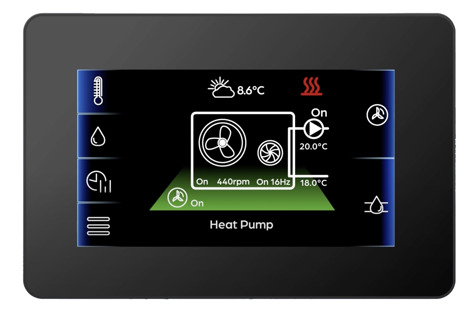
Outdoor temperature and weather compensation
The outdoor air temperature reading will be detected and monitored if a weather sensor is installed on the outside of your home. This outdoor temperature sensor connects to your Aerona Smart Controller and enables the weather compensation functionality. Weather compensation uses these outdoor temperature readings to adjust the flow temperature of your heat pump.
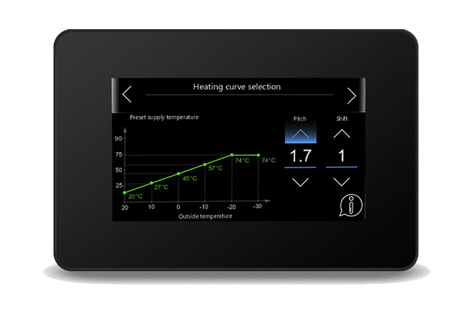
The Aerona Smart Controller’s sophisticated weather compensation is managed via its heating curve configuration screen. The heating curve controls the system water temperature in line with the temperatures outside, adjusting the flow temperature depending on the outdoor air temperatures:
- when it is colder outside, the controller will automatically increase the flow temperature
- when it is warmer outside, the controller will automatically reduce the flow temperature.
Correct heating curve configuration enables weather-controlled adjustments to be made to maximise the efficiency of your heat pump’s operation.
Room temperatures
The room temperature display on the Aerona Smart Controller shows the indoor air temperature for the selected circuit. This room temperature value can be accessed via the Smart Controller’s home screen. Depending on how your heat pump heating system has been designed will determine how many circuits (or areas) are set up on your controller – if you have more than one circuit, the room temperatures for each circuit can be viewed by swiping the screen.
A heating circuit refers to a particular room or set of rooms. The Aerona Smart Controller allows values, including room temperature, to be set per circuit to ensure the desired conditions are achieved within each room or zone. The Aerona Smart Controller home screen will display:
- current room air temperature for the circuit
- the desired room air temperature for the circuit
- whether the heat pump is operating in a day or night mode.
Operating status and schedules
The Aerona Smart Controller enables users to view and adjust the schedules for the heating and domestic hot water and access the heat pump’s operating settings. Having visibility of these core settings and schedules will help you understand how your heat pump is working and help diagnose issues if they occur:
- Check when your heating and hot water is due to come on by viewing the scheduling set up – simply tap the ‘heating and DHW schedule’ icon on your controller’s home screen to view and, if required, edit your daily schedules
- View a schematic diagram indicating your heat pump’s operating status – by tapping the ‘heat pump fan’ icon in the top right-hand corner of your controller’s screen, this diagram will show if your heat pump is on and what the flow and return temperatures are
- View a schematic diagram highlighting the wider heating system and which components are operating – access this diagram by tapping the icon on the right-hand side of the screen beneath the heat pump fan icon
Be alerted to any faults detected – the ‘alarm’ icon will only show on your controller’s home screen if there is a fault detected on the heat pump or wider system. If this icon displays, please refer to your Aerona Smart Controller User Instructions for additional support.
Using the Aerona Smart Controller’s remote monitoring features
The Aerona Smart Controller incorporates advanced software to help maximise heat pump efficiency. While its technology is sophisticated, the Aerona Smart Controller clearly presents key heat pump performance data which can be accessed and interpreted by homeowners and their installers. Your Grant heat pump’s data can be monitored via:
- the Aerona Smart Controller’s wall-mounted 4.5” colour touchscreen display
- the ecoNET app
- the ecoNET web-based platform.
The ecoNET app and ecoNET web-based platform facilitates remote access and monitoring of the Aerona Smart Controller. The ecoNET applications gives homeowners remote access and visibility of their heat pump performance even when away from the home. You can use the ecoNET app to view live data such as room temperature(s), hot water temperature, heat pump operating statuses and more. Meanwhile, your installer can access in-depth technical data using the ecoNET web browser to make adjustments to improve system efficiency or assist with remote diagnostics if something is not working.
How to interpret your heat pump data in everyday scenarios
Having access to lots of data and information is great provided it can be understood. As already outlined in this blog, a heat pump controller presents a wide range of data reflecting how a heat pump unit is working and how it is set up to end-users and installers. This data can also be used to provide the solutions to problems, if they arise with your system. Here are some examples.
“My home does not feel warm enough”
If your home is feeling cold, you can:
- check the room temperature reading (either via the Smart Controller display, a room thermostat display or your ecoNET app) – if the temperature reading is lower than you want, you can boost the temperature and increase the desired temperature for the room
- check your heating schedule (via the Smart Controller display or ecoNET app) to see if your heat pump is scheduled to be on at the time – your scheduling may need adjusting to ensure your comfort levels are met
- check your heat pump’s operating status (via the Smart Controller display or ecoNET app) to view the flow temperature – if something does not look right, please contact your installer for guidance and support.
“I’m worried my running costs are too high”
Air source heat pumps use electricity to operate and heat your home. During the winter months, you should expect to see an increase in electricity usage and costs because your heat pump will be operating more in the colder temperatures. However, during the remainder of the year, your heat pump’s electricity usage should be less provided the system is set up and working correctly.
If your running costs appear high, you can:
- check the flow temperature of your heat pump (via the Smart Controller display or ecoNET app) – heat pumps operate more efficiently at lower flow temperatures (usually between 35ºC-45ºC depending on your emitter type) so if you think your flow temperature is high, please discuss this with your installer
- check your heating and hot water schedules (via the Smart Controller display or ecoNET app) to ensure that a suitable schedule of ‘setback controls’ is in place – if your room temperatures are allowed to get too cold, the demand on your heat pump will be more to reach the warmer room temperatures set during your occupied hours (read more about setback controls for heat pumps here)
speak to your installer about weather compensation – your installer could view the heating curve configuration on your Aerona Smart Controller and review whether adjustments can be made to help optimise efficiency.
When to contact your installer
If your heat pump controller displays error codes or data readings which you are unsure about, you should contact your installer or another qualified heat pump engineer for support. Online resources and user instructions provide guidance to homeowners but if you have any concerns about how your heat pump is working, you should speak to your installer. It is also important that you do not make changes to your heat pump system’s parameters or any of the settings which should only be viewed or adjusted by a heating engineer or installer.
Learn more about Grant Aerona Heat Pump Controls
Grant UK supply the Aerona Smart Controller and Aerona Remote Controller as part of kits designed to complement and control Aerona heat pump system installations, making life easier for installers and their homeowners. Please visit our other resources for additional information about the Aerona Controls range:
- Read more about the features of the Aerona Smart Controller and Remote Controller
- Download the User Instructions for Grant heat pumps, controls and accessories
- Visit Grant UK’s YouTube Channel to watch a video playlist about how to use the Aerona Smart Controller.
Was this article useful?
Have more questions? Submit a request
Are you a professional? View our Professional Support Centre
Couldn't find what you were looking for?
Alternatively you can speak to a member of our team - Subject to Operating Times